You can receive estimated arrival times by text message with RFTA SMS Text Schedules. You can get information online in advance of your trip or find information on how to text at any posted bus stop!
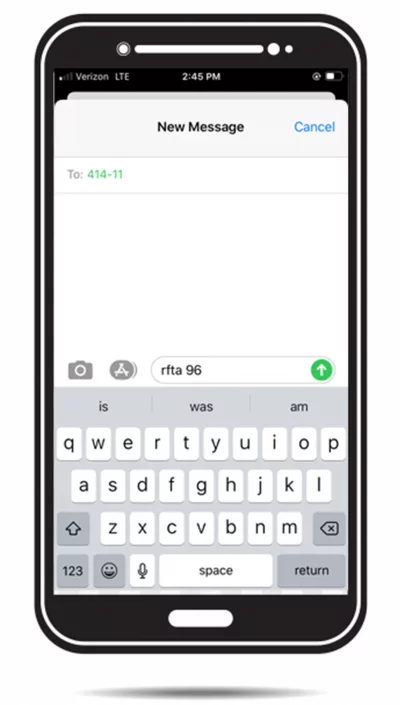
Text rfta [stopID] to 41411 Be sure to text the word “rfta”, a space, and then the actual stop ID number, such as “rfta 96” (without quotes).
Receive estimated arrival times.
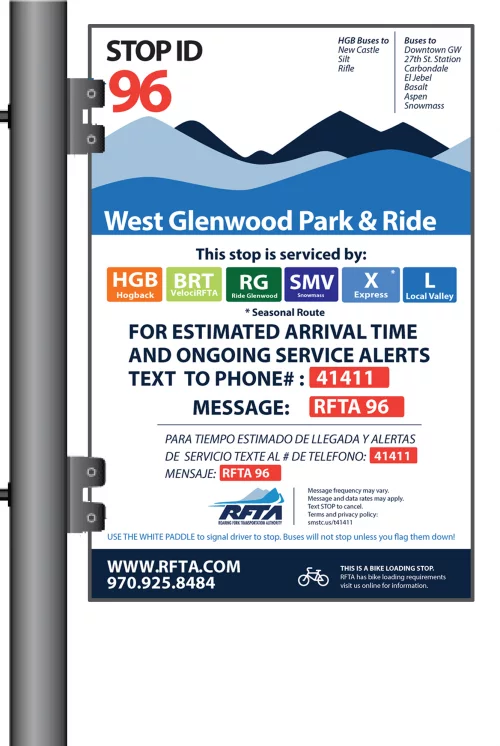
Information about how to text for estimated arrival times is posted at all RFTA bus stops as seen in the example below.
EXAMPLE:
Here’s how the text message you send might look if you were going to catch a Local Valley bus at the West Glenwood Park & Ride (stop ID 96).
TRY IT!
Send rfta 96 to 41411, like this:
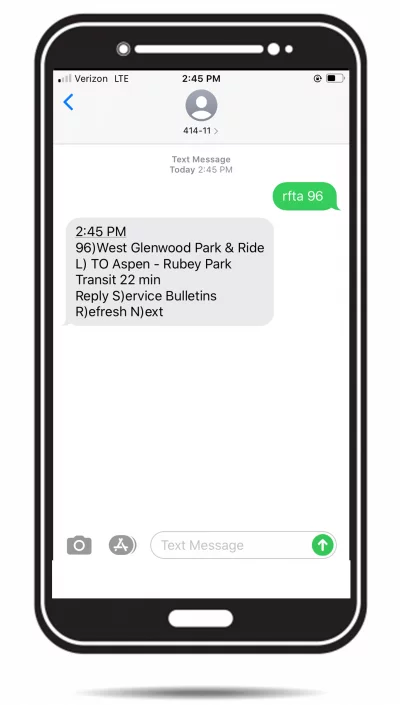
AND… AFTER YOUR MESSAGE IS RECEIVED, YOU’LL GET A MESSAGE LIKE THIS:
This example response says that, as of 2:45 PM, at stop 96 (West Glenwood Park & Ride), the Local bus TO Aspen is due to arrive in about 22 minutes.
ADDITIONAL COMMANDS
You can also reply to this message with “S” to get any service bulletins that may affect your trip (customer alerts), or “R” to refresh the latest, most updated result for the same stop.
If your stop has multiple routes serving it, your results may not fit in one text message. In that case, you can also reply with “N” to see the next result for the stop you requested
If you have subscribed to receive text messages for service alerts or arrivals at scheduled times from the MyRFTA Bus Tracker website, you can always reply with (or send a new text with) “STOP” to unsubscribe.
(Remember: Message and data rates may apply. Check with your mobile carrier first.)